

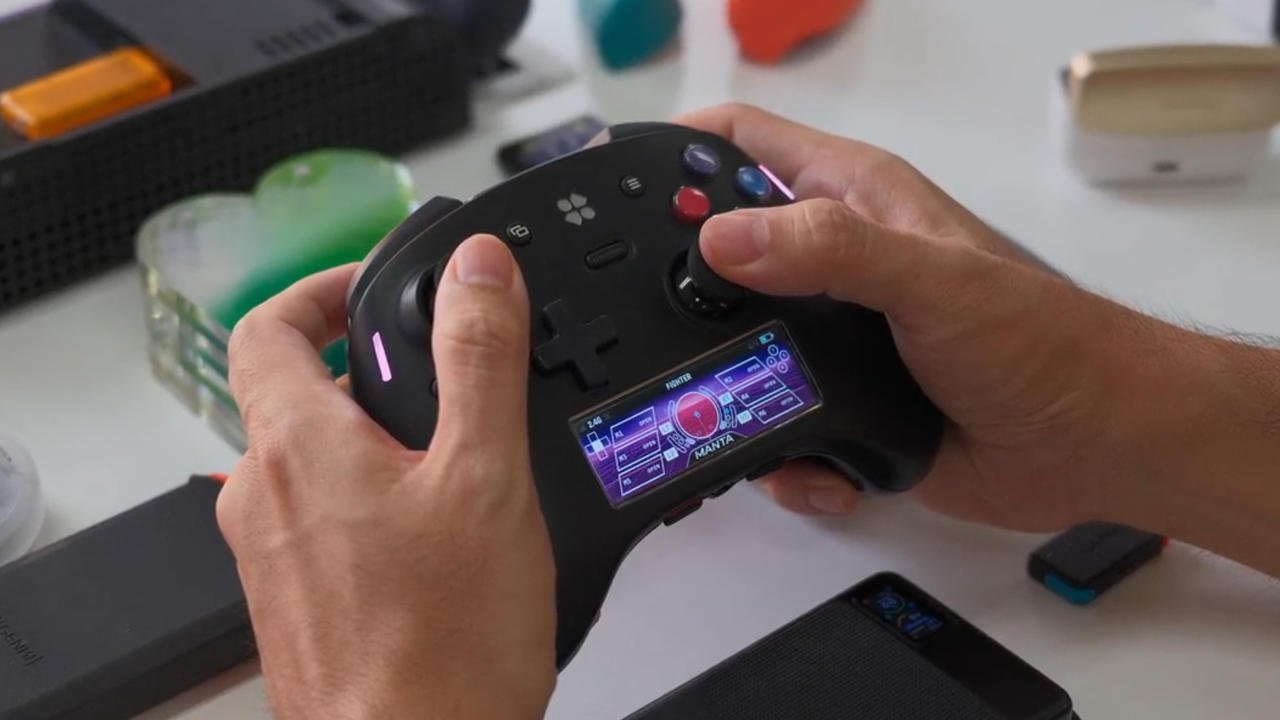
An operating system living inside a gamepad. That’s the sales pitch for the Genki Manta, and for $279, it needs to be something more than a novelty.
Genki, the outfit responsible for some of the stronger Switch 2 and Switch accessories on the market, has opened a Kickstarter for what may be the most over-engineered controller I’ve laid eyes on. The Manta packs everything you’d want from the category’s high end — TMR sticks, adjustable triggers, advanced haptics — and then doesn’t stop, adding a full operating system and a digital display built into the body of the pad.
Peripherals that drag their category forward have my support. I’m just not certain who’s asking for a controller this elaborate.
The design choices that actually make sense
Rather than sitting above the thumbsticks, the way Turtle Beach positions it on the Stealth Ultra, the screen is centered below them. That’s the better call. Thumbstick tension can also be tuned on the fly — literally, by twisting the stick itself.
At some stage, though, you have to wonder whether this crosses into overkill.
Genki is well aware of what it’s built. “We refused to cut corners,” the Kickstarter reads. “It is, frankly, a spec monster.”
What’s under the hood
PC connectivity comes via USB-C wired or 2.4 GHz wireless through a dongle, while Switch 1 and 2, mobile and other devices connect over Bluetooth. Its layout is the standard Xbox-style arrangement, offset sticks and all the usual inputs included. Power comes from a user-replaceable 2,400 mAh battery, although the Kickstarter page offers no estimate of runtime between charges. It can also wake a paired Switch 2 remotely, which counts as a small mercy.
Instead of registering only when bottomed out, the face buttons — branded “Analog Pulse Buttons” — read their entire range of travel. You choose your own actuation point as a result, from a shallow rapid-reset setting for burst inputs to a deeper press that requires real intent.
Three trigger modes are on offer. Digital delivers short travel with a crisp click. Rapid is fully analog across short, smooth travel. Analog uses the full range with proportional control.
After that comes the rest of the heap: “maglev haptics” (an upgrade on traditional rumble, apparently), a nine-axis gyroscope/accelerometer/compass for motion controls, six additional inputs, and a D-pad that switches between a conventional cardinal layout and an eight-point satellite dish design. Those six extra inputs consist of a pair of buttons tucked up top next to the bumpers, two integrated back buttons and two removable back paddles.
The part where I changed my mind
Everything a driver or companion app would normally handle instead runs through the color display via MantaOS. Swapping profiles, macros, tweaking inputs, RGB lighting — it all lives on the controller itself.
That by itself would be a clever trick. The thing that won me over is the small button beside the right thumbstick.
Tap it and an “On-the-Fly KBM” pops up, converting the screen into a QWERTY or Compass Quick Type keyboard. Hold it and the entire controller turns into a gyro-controlled mouse. Just like that, you’re moving around the Windows desktop, clearing login screens and game launchers without touching anything else. It’s the same friction-killer that makes living with a Steam Deck or Steam Machine easier than a handheld or PC on Windows — only Genki tackled it from the controller side rather than relying on SteamOS.
Partway through writing this, my take flipped from “unnecessarily over-engineered” to “wait, that’s actually awesome.”
Macros that record how you played, not just what you pressed
Recording on the macro action timeline goes beyond the typical input-and-delay approach. Analog stick paths, trigger pressure and more get tracked, letting you capture and replay a complete gameplay sequence — a punishing boss runback, say. (I’m looking at you, Bilewater.)
Customizable dashboards also run on the screen, covering your active profile, polling rate, battery and connection status.
A programmable layer sits on top as well, powered by a dual-core Raspberry Pi RP2350 and capable of loading external apps onto 16 MB of internal storage. A clip in the Kickstarter shows a side-scrolling space shooter playing on the built-in screen, and the campaign raises the possibility of a “Genki Forge” where users build and share homebrew apps for MantaOS. Somebody is going to get Doom running on this within days.
The money
As of this writing, the live Kickstarter has drawn roughly 1,800 backers and over $400,000 in pledges — four times its $100,000 goal.
Retail sits at $279, though a Super Early Bird tier brings that down to $189, placing the Manta in DualSense Edge territory. That’s still nearly twice the $100 Steam Controller, which has tricks of its own but leaves out most of the advanced hardware found here.
Backers should get theirs this coming January, according to Genki, with a conservative delivery estimate spanning January through April 2027. Plenty of time, then, for everyone to work out whether a controller needs a homebrew scene.